Infrastructure MOC: Network Architecture and 3‑2‑2 Backup
Layered backup and synchronization topology built with Proxmox, Synology, Obsidian, and Syncthing.
📌 General System Topology
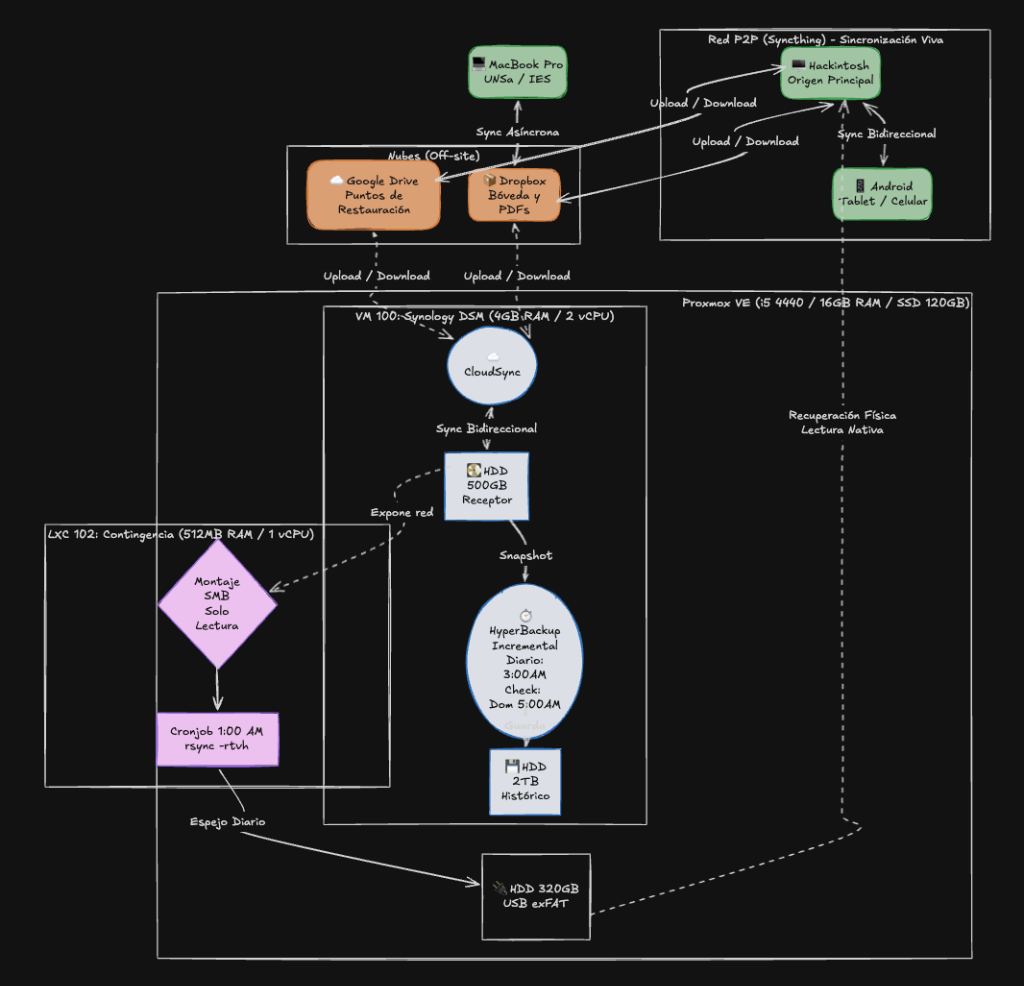
🎯 Design Purpose
This infrastructure uses a layered 3-2-2 strategy to improve availability, synchronization, and recovery from serious failures. It separates two areas of responsibility: a lightweight application-level backup for notes and a broader infrastructure-level backup for the rest of the data.
💻 Hardware and Resource Allocation
The topology runs across the following physical and virtual nodes:
- Primary workstation: A desktop Hackintosh that acts as the main editing and organization environment for the Obsidian vault.
- Academic workstation: A 2015 MacBook Pro used at IES and UNSa. It synchronizes asynchronously through Dropbox as part of Tier 1.
- Lightweight touch environment: Android devices operating as lightweight clients with real-time synchronization through Syncthing in Tier 3.
- Homelab server (Proxmox VE): A physical Intel i5-4440 system with 16 GB of
RAM and a 120 GB SSD. It acts as a hypervisor for:
- VM 100 (Synology DSM): A virtual NAS with 4 GB of RAM and 2 vCPUs. It directly manages a 500 GB HDD for Cloud Sync data and a 2 TB HDD for Hyper Backup history.
- LXC 102 (contingency): A lightweight Debian 12 container with 512 MB of RAM and 1 vCPU. It isolates the scheduled rsync process.
- Portable contingency storage: A 320 GB external USB hard drive formatted as exFAT. It can be physically disconnected and read directly from macOS or Windows after a serious server failure.
🛡️ Tier 1: Application-Level Backup (Obsidian)
This tier protects the knowledge vaults.
- Synchronization flow: Active vaults synchronize through Dropbox.
Obsidian’s
Local Backupplugin adds separate compressed restore points. - Backup mechanism:
Local Backupcompresses the entire vault into a self-contained.ziparchive and writes it to Google Drive. - Device profiles: Each device has a profile suited to its workload:
- Primary machine (Hackintosh): Runs the complete plugin set and uploads
the
.ziparchive through the local Google Drive client. - Secondary machine (MacBook): Shares the main plugin and shortcut configuration, but writes backups to a local placeholder path without running Google Drive in the background.
- Mobile devices (Android): Use an isolated
.obsidian-mobileprofile to prioritize startup speed, battery life, and touch usability.
- Primary machine (Hackintosh): Runs the complete plugin set and uploads
the
🔗 Related documentation:
🏗️ Tier 2: Infrastructure-Level Backup (Proxmox and NAS)
This tier protects the broader data set independently of file type.
-
Operational bridge (Cloud Sync): The Synology DSM virtual machine is the central synchronization service. It synchronizes bidirectionally with Google Drive and Dropbox on the primary 500 GB drive. This makes files editable from local and cloud environments, while the next layers reduce the risk of propagated errors and deletions.
-
Versioned history (Hyper Backup): Every day at 3:00 AM, the NAS creates an incremental backup of the 500 GB drive on the secondary 2 TB drive. The history provides recovery points for malicious encryption and accidental deletions propagated from the cloud.
-
Contingency outside the NAS service (LXC and rsync): At 1:00 AM, an LXC container separated from the NAS service runs an automated rsync job.
- It reads the NAS data through a read-only share and copies it to a 320 GB USB drive formatted as exFAT.
- Direct recovery: After a total server or motherboard failure, the drive can be disconnected and read directly on the Hackintosh. Files remain accessible without first rebuilding the server, reducing recovery time.
🔗 Related documentation:
🔄 Tier 3: Live P2P Synchronization (Mobile)
This layer gives mobile devices fast access to the vault without copying the full cloud data set.
- Tool: Syncthing.
- Purpose: Connect the primary Hackintosh and Android devices directly with bidirectional synchronization.
- Why the MacBook is excluded: The academic MacBook is a complete desktop
environment and remains part of Tier 1 through selective Dropbox
synchronization. Content can be created offline in
00_inbox, synchronized during a brief tethered connection, and organized later on the primary workstation.
🔗 Related documentation: