IA Local, Privacy and Automation: Translating my Portfolio with Ollama
A deep analysis on how to implement an automated translation flow using local LLMs (Ollama + Llama 3) in a Hackintosh environment. Architecture, advantages, disadvantages, and code.
In the era of generative artificial intelligence, relying on cloud-based APIs (such as OpenAI or Anthropic) has become the default standard for most developers. It’s “easy”: you pay, send a JSON, and receive a response. However, for personal projects, dependence on third-party services introduces friction: recurring costs, network latency, API key management, and above all, growing concerns about data privacy.
I’ll walk you through the step-by-step implementation of a 100% local automatic translation system for this portfolio using Ollama, Node.js, and Git Hooks. This system allows me to write content exclusively in Spanish and delegate internationalization to my own hardware, without leaving my terminal or paying an extra cent.
The Cloud Problem
Before diving into the code, let’s examine why someone would want to complicate their life by setting up a local infrastructure when GPT-4 exists.
- Variable Cost vs. Fixed Cost
The APIs of LLM charge by token. Although cheap, the psychological cost of “paying to test” hinders innovation. If I want to re-translate my entire blog (100 posts) because I changed the prompt to sound more “professional”, that has a cost in dollars. With a local LLM, the marginal cost is zero (or rather, the cost of electricity). I can iterate the prompt 50 times until it’s perfect.
- Latency and Work Flow
It depends on the cloud implies network. If I’m programming in an airplane, in a coffee shop with poor WiFi, or simply the service goes down, my CI/CD pipeline breaks. A local model lives on my NVMe. It’s always there.
Privacy by Design
This is a crucial point. My drafts, my disorganized personal notes, my internal comments… none of that should leave my machine until I decide to publish it. By using an external API, you’re sending your raw creative process to foreign servers. By using local AI, the refinement process is private.
The Solution: Ollama + Llama 3
Ollama has democratized local inference. Before, running a quantized model required compiling llama.cpp by hand, understanding dark CUDA/Metal parameters, and struggling with Python dependencies. Ollama wraps all this up in a simple binary written in Go.
For this project, I use Llama 3 (8B).
- Why 8B?: It’s the sweet spot. The 70B models are too heavy for an average consumer GPU (they require ~48GB VRAM to run comfortably). The 8B model runs perfectly in 8GB-16GB of RAM/VRAM with a inference speed superior to human reading speed.
- Translation Quality: For English-Spanish translation, Llama 3 has surprisingly proven to be capable, understanding technical nuances better than previous models like Mistral 7B.
System Architecture
The workflow is transparent and invisible. There’s no graphical interface, no “Translate” buttons. The translation is a secondary effect of my Git workflow.
Component 1: The Engine (auto-translate.js)
This Node.js script is the orchestrator. It doesn’t just blindly send text; it understands the semantics of my Markdown files.
Challenge: The Context and the Frontmatter
Static site generators (such as Astro, which I’m using here) rely on “Frontmatter” (YAML metadata at the beginning of the file). A common mistake when translating with AI is that the model, in its eagerness to help, translates everything, breaking the code.
If I have:
tags: ["technical", "personal"]And the AI returns to me:
etiquetas: ["técnico", "personal"]My site is breaking down. The script must be surgical.
The Implementation
I use the library gray-matter to separate content and metadata. Here is the simplified logic:
/* scripts/auto-translate.js (Simplificado) */
async function processPost(filePath) {
const { data, content } = matter(read(filePath));
// 1. Traducir metadatos específicos
const newTitle = await translate(data.title);
const newDesc = await translate(data.description);
// 2. Traducir el cuerpo
// Aquí está el truco: NO enviamos todo el cuerpo de una vez.
// Los LLMs tienen ventana de contexto limitada y pueden "alucinar" en textos largos.
// Dividimos por encabezados (##).
const sections = content.split(/(\n## )/);
const translatedSections = await Promise.all(sections.map(translate));
// 3. Reconstruir
return matter.stringify(translatedSections.join(''), {
...data,
title: newTitle,
description: newDesc
});
}Component 2: Translation Overrides Dictionary (translation-overrides.json)
No AI is perfect. In the world of development, we use English terms that don’t need to be translated. “Dotfiles” isn’t “Point files”. “Framework” isn’t always “Workframe”. “Hackintosh” definitely shouldn’t be translated.
To resolve this without complicating the prompt, I implemented a “hard-override” system. Before calling AI, the script consults a local JSON file.
{
"Dotfiles": "Dotfiles",
"Silakka54: Ergonomía Programable": "Silakka54: Programmable Ergonomics",
"Loutaif Connect": "Loutaif Connect"
}This gives me total and deterministic control over the names of my projects. It’s a semantic security layer.
Component 3: Scalable Automation with Husky
To ensure that no one (not I nor another collaborator) can break the synchronization between Spanish and English, we replace manual scripts with Husky.
Husky manages Git Hooks in a professional and version-controlled manner.
- Installation:
npm install husky - Hook:
/.husky/pre-commit
The content of the hook is the last line of defense:
#!/bin/sh
. "$(dirname "$0")/_/husky.sh"
# 1. Ejecutar traducción (Rápido gracias al Caché MD5)
npm run translate
# 2. Agregar los archivos generados al commit en curso
git add src/content/posts/enWhy is it better?
Unlike a manual hook in .git/hooks/ (which isn’t shared when cloning the repo), Husky’s configuration lives in package.json and the repository. If you clone this project on another Mac tomorrow, npm install will automatically configure translation protection. Zero forgetfulness, total scalability.
This fundamentally changes the writing experience.
- I write
my-post.md. - I make
git commit -m "New post". - I see “Processing…” in the console.
- A few seconds later, the commit is complete and already includes the English version.
Performance Analysis and Hardware: The Reality of RX 580 in Hackintosh
My workstation is a Hackintosh with an Intel Core i7 14700K processor and an AMD Radeon RX 580 (8GB). When implementing this system, I came across a fascinating technical case study on the compatibility of Metal.
The Dichotomy of Metal: Graphics vs. Compute
MacOS handles the RX 580 excellently for visual interface, games, and video rendering, utilizing what we could call Metal Graphics. However, AI inference requires Metal Compute.
Ollama (based on llama.cpp) uses aggressively optimized Metal kernels for Apple Silicon (M1/M2/M3). The Polaris architecture of the RX 580 lacks certain modern instructions that these kernels expect. Upon detecting this, Ollama performs a smart “fallback”:
- Try to initialize Metal.
- Detects computing incompatibility on the GPU.
- Offload the load to the CPU to ensure stability.
Real-World Performance (CPU Inference)
Instead of using the VRAM, the model runs on the system’s RAM and is processed by the cores of the i7.
| Métrica | Valor (i7 14700K) |
|---|---|
| Modelo | Llama 3 (8B) |
| Backend | CPU (AVX2) |
| Uso de GPU | 0% (Solo Video) |
| Velocidad | ~11 tokens/segundo |
Although a modern GPU or Apple Silicon would achieve 40+ t/s, 11 t/s is perfectly functional for a background process. A 1000-word article takes around 2-3 minutes to translate. During this time, the CPU fans will spin up, but the system remains stable and the translation completes error-free.
Challenges Found and Solutions
Hallucinations in Long Texts
Initially, I tried to send the entire post to the AI. Result: In long posts, from the third paragraph on, the AI would start summarizing instead of translating, or change the tone, or insert comments like “Here represents the translation…”*.
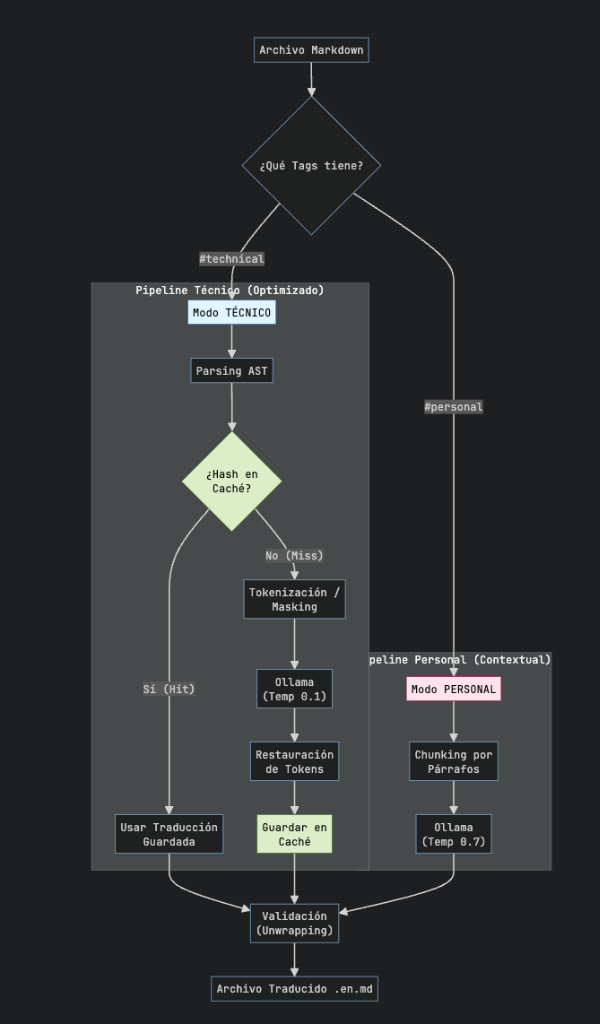
Evolution 3.0: Tokenization, Smart Router, and “Personalities”
Originally, I tried using Regex, then moved to a surgical AST. Both had flaws: the Regex would break code, and the AST sometimes duplicated headers or broke image syntax () if the LLM decided to be “creative”.
The definitive solution (current version) implements three advanced techniques:
Tokenization (Masking)
The golden rule: “If you don’t want AI to break it, don’t show it to her”.
Before sending the text to Llama 3, the script scans the Markdown looking for volatile elements (inline code blocks ![]).
- Kidnapping: Replace
with a opaque token:. - Translation: The LLM receives: “Translate this: IMG_0 is amazing.”
- Restoration: Upon receiving the response, the script searches for
__IMG_0__and reinserts the original image. Result: Zero broken images. Guaranteed.
Smart Router (“Dual Personality”)
Not all content is equal. A technical note about kernels requires precision; a poem or essay needs “soul”.
| Modo | Trigger (Tag) | Temperatura | Estrategia | Objetivo |
|---|---|---|---|---|
| Técnico | technical | 0.1 (Frío) | AST + Masking | Precisión absoluta. Traduce nodo por nodo. Lento pero seguro. |
| Personal | personal | 0.7 (Creativo) | Chunking | Fluidez. Traduce párrafos enteros para mantener el contexto literario. Rápido. |
C. Unwrapping Logic
A persistent bug was that the LLM returned double headers (## ## Title).
I implemented a post-translation validation that compares the structure of the original node with the translated one. If both are headers, I extract the internal text to avoid hashtag duplication.
The Cost of Precision (CPU Time)
Running in Technical Mode (AST node by node) on the CPU takes considerable time (~20-25 minutes for a long post). It’s the price to pay for privacy and precision. While the GPU (RX 580) handles the desktop smoothly, the i7 processes silently in the background. Automation doesn’t need to be instantaneous, it just needs to be unattended.
Final Optimization: Solving the “Amnesia” with Hashing (MD5)
After several iterations, we identified a critical inefficiency in the Technical pipeline. The script operated in a “stateless” (memory-less) manner: if it had an article of words and added a new paragraph of words, the system would re-translate the entire thing ().
This was wasting CPU cycles by re-translating static content. The solution was to implement a persistent cache layer:
- Hashing: Before processing a node, we calculate its MD5 hash.
- Lookup: We consult a local database (
translation-cache.json). - Decision: If the hash exists (Hit), we recover the translation in 0ms. Only if it’s new content (Miss), we invoke AI.
Technical Note: This optimization is exclusive to the Technical mode, where paragraphs are independent and prior context does not alter technical meaning. In the Personal mode, we intentionally disable caching: in narrative, the context () semantically affects what’s new (), so it’s necessary to regenerate the entire flow to maintain literary coherence.
Conclusion
Integrate local AI into the web development workflow is more than a technical curiosity; it’s a statement of principles about ownership of our tools.
We have built a system that is:
- Private: Nothing comes out of
localhost. - Free: No API billing fees.
- Robusto: Functions offline and with complete control over the dictionary.
- Transparent: Integrated in
git commit.
This approach is applicable to technical documentation, corporate internal wikis, or any knowledge management system where privacy and cost are factors.
If you have a decent GPU (even integrated in new Macs), I invite you to try it out. The feeling of watching your own machine “think” and work for you is, simply, the future of personal computing.
Automated translation (technical mode).